
Sanctum Finder + Minimap Auto-Detect
Open Sanctum Finder
No downloads or installations needed — open aniimo.kr to use the Aniimo overlay right away. Float the World Map and Egg Heist Random Sanctum maps in a small window over your game, and simply share your screen: it reads the minimap and tracks your position live on the world map and in sanctums.
Identifies your current Random Sanctum in Egg Heist from the minimap and displays Egg Nest and Key Room locations. It also tracks your position live inside the sanctum and on the Egg Heist outdoor island.
Sanctum Finder → “Minimap auto-detect” → “Float map”
Open Sanctum FinderFloat habitats, Alphas, treasure chests and Random Sanctum locations in a small window over your game. Share your screen and it reads the minimap to show your live position and facing direction on the world map; the floating window follows the main map too.
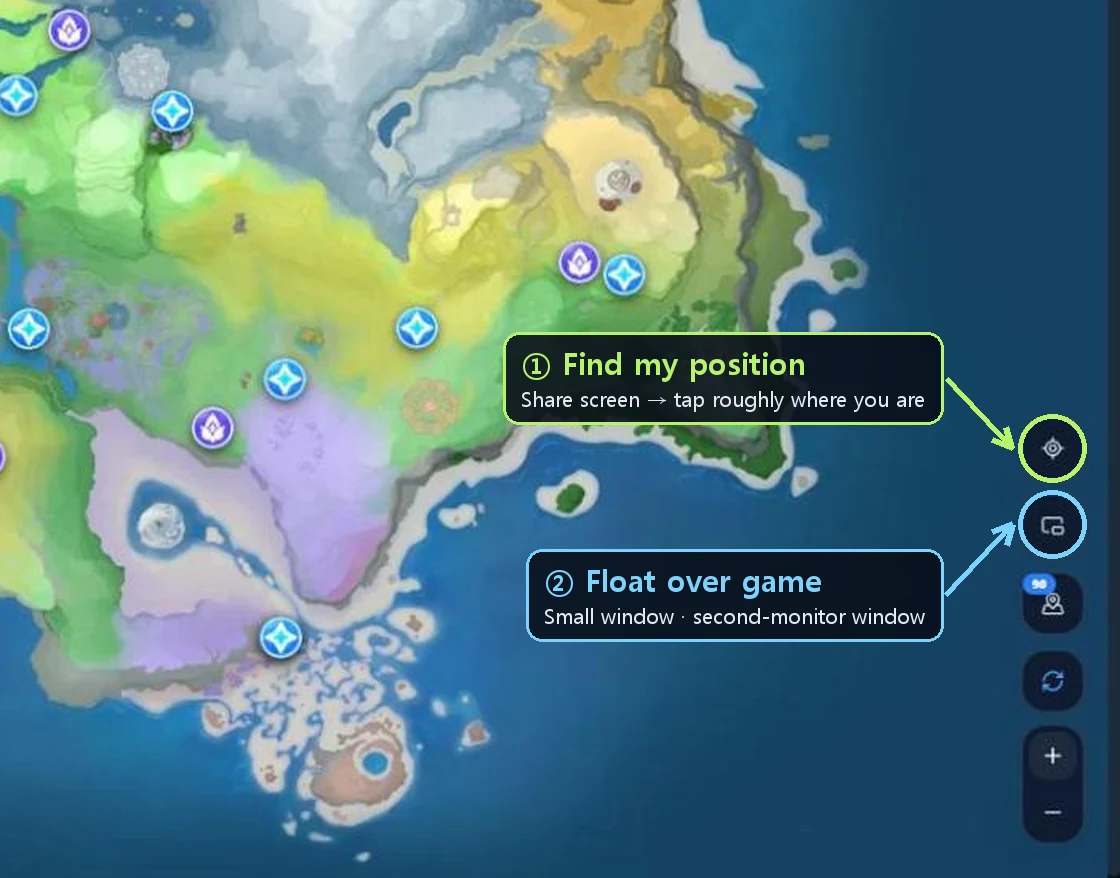
World Map → ⌖ “Find my position (screen share)” → tap roughly where you are → “Float over game”
The first time, just tap roughly where you are on the map. It finds the exact spot nearby by itself and then follows you as you move.
Open the World MapIf you have dual monitors, open the map in a normal window and keep it large on your second monitor. You can freely resize or maximize it, and it follows the map and your position on the main screen.
The floating window over the game (Document PiP) works in desktop Chrome and Edge. Other browsers will open it as a regular window or a large window for a second monitor.
Run the game in windowed or borderless fullscreen mode. If the floating window goes behind the game, change the game's display mode first.
In the Sanctum Finder, share your game screen with “Minimap auto-detect” and click “Float map”. In the World Map, click “Float over game”.
Drag the floating window to move it and drag its corners to resize. Your window size is remembered for next time.
The Aniimo overlay is a web page. You open it in your browser and use it right away; it never reads or modifies game files or memory. Live position and sanctum auto-detection use the browser's screen share to analyse only the minimap area, and frames are processed only on this PC — nothing is sent or saved.
There is no need to download updates. Whenever the site updates, you immediately get the latest maps and data next time you open it.
Yes, it is completely free. No sign-up or login required.
No. With no exe or installer files, simply open aniimo.kr in your browser and use it right away.
Try switching the game's display mode to windowed or borderless fullscreen. Floating windows over the game work only in desktop Chrome and Edge; in other browsers it opens as a regular window.
On the world map (Habitat Map), inside Egg Heist Random Sanctums and on the Egg Heist outdoor island. It analyses the game's minimap locally on your PC. On the world map, tap roughly where you are once — it finds the exact spot by itself and follows you from there.
No. Because it works by opening a web page window, it never reads or modifies game files or memory. Auto-detection only analyses the frames received via the browser's screen share locally on this PC.
Yes. In the Sanctum Finder or the World Map, click “Open in a large window (second monitor)” to open a standard resizable window.
On mobile phones, you can view the map and sanctum finder directly. For the floating window over games and screen-sharing auto-detection, please use desktop Chrome or Edge.
Yes. The Sanctum Finder and World Map are available in English and Japanese, and the floating window will display in that language as well.